Automations Overview
Sales Jumpstart CRM – Automation Overview
This guide outlines a few of the key automations built into your Sales Jumpstart CRM. These automations are designed to streamline your lead handling process, keep potential customers warm, and ensure you stay organized without having to manually track every touchpoint.
1. New Lead via Website Form
Trigger: Lead fills out a contact form on your website
Automation Actions:
- Adds the lead to your Sales Pipeline in the "New Lead" stage under Opportunities
- Sends a confirmation email to the lead (friendly acknowledgment that the form was received - this is a branded email template to look super pro!)
- {{contact.first_name}}, Thank you for reaching out to us! We have received your form and will be in touch within 24 hours (or on Monday if it's the weekend).
- Sends a confirmation text message to the lead (simple “we got your message, we’ll be in touch soon”)
- “Hello {{contact.first_name}}. We received your inquiry and will follow up to schedule a time to get together. For now, if you want to speed up getting a free estimate, please share any images or video of your space. - {{location.name}}”
📌 Goal: Make a great first impression and confirm receipt to build trust immediately.
🖼️ Visual:

2. Missed Call Text-Back
Trigger: A potential lead calls your tracking number but the call is missed
Automation Actions:
- Sends an automated text message:
- “Hi, this is {{user.first_name}} from {{location.name}}, we saw that we missed your call and will get back to you as soon as we can. To speed up an estimate or to schedule a time to meet, complete this form on our website: {{ custom_values.free_estimate_page }}. Thanks! Talk to you soon 🙂”
🔁 Timing Control: This automation is designed to only send once every 90 days to the same number, avoiding duplicate or repetitive messages that feel robotic.
📌 Goal: Keep leads warm and show responsiveness, even when a call is missed—reducing the risk of them moving on to a competitor.
🖼️ Visual:

3. Project Completion & Review Requests
Trigger: A lead is moved to the “Project Complete” stage in the Opportunities Pipeline
Automation Actions:
- Sends an initial email asking for a Google review
- If no review is submitted, a follow-up email and text go out a few days later
- Final reminder email/text goes out a few days after that (3-touch sequence total)
📌 Goal: Encourage happy customers to leave public reviews—this boosts your online reputation and helps generate future leads.
🖼️ Visual

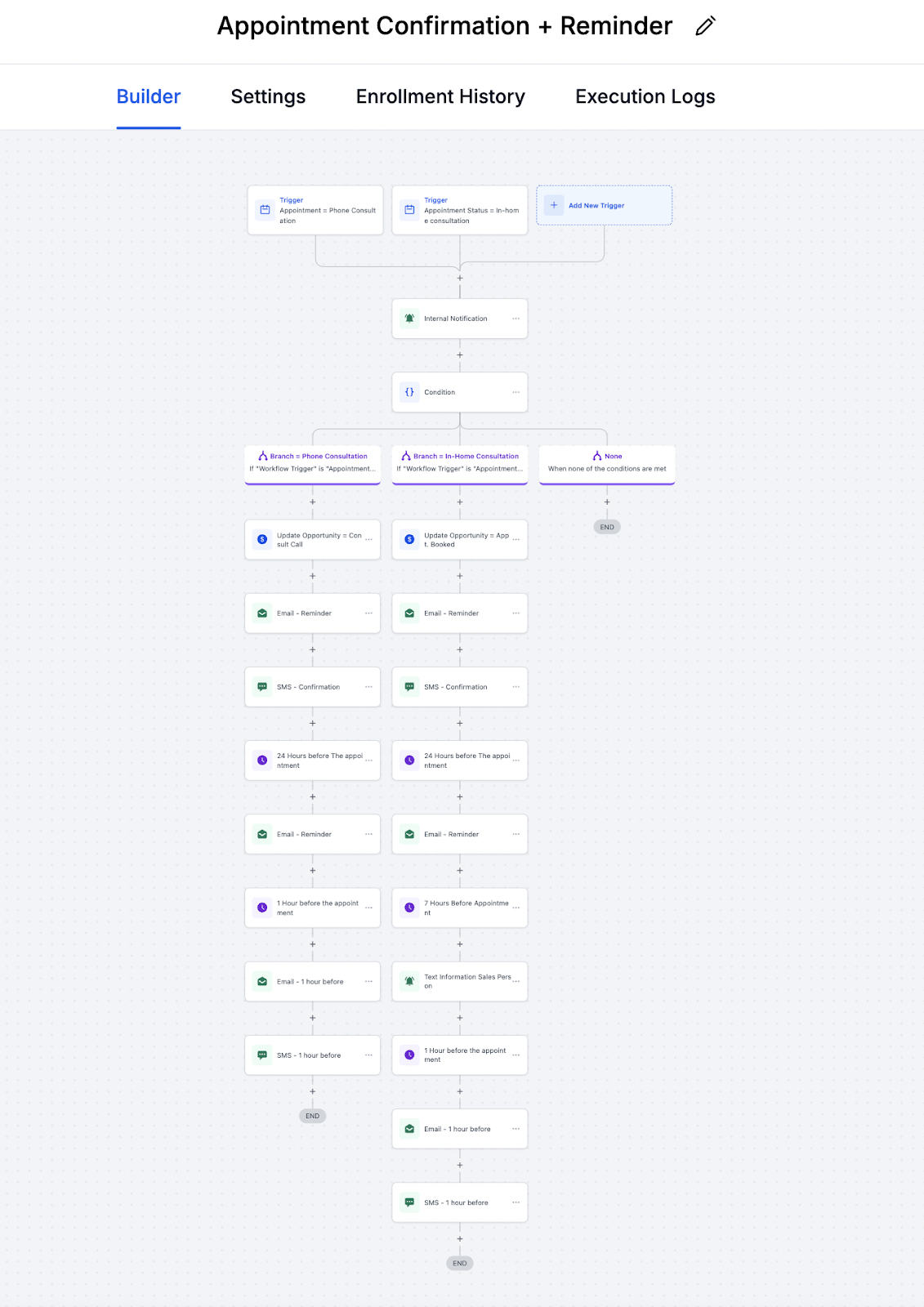
4. Appointment Booking Automations
Trigger: You book a consultation (phone or in-home) through the CRM calendar
Automation Actions:
- Automatically updates the lead’s stage in the sales pipeline:
- Phone consult → moves to "Consult Call" stage
- In-home appointment → moves to "Appointment Booked" stage
- Sends the lead:
- Appointment confirmation email and text
- Reminder emails/texts:
- 1 day before
- 1 hour before
- Sends internal notifications to your team so you’re in the loop
📌 Goal: Increase show-up rates for appointments and keep your calendar organized without extra admin work.
🖼️ Visual: