
03/31/26: The Tool That Shows Why You're Winning (or Losing) Jobs
The Big Problem
Most deck builders don’t actually know why they’re winning (or losing) jobs.
They assume:
- “We just need more leads”
- “The market is slow”
- “People are price shopping”
But what’s really happening is simpler:
👉 Homeowners are comparing you to other builders online—and making decisions fast.
And most builders never see that comparison clearly.
Why Most Builders Get This Wrong
Most builders don’t have a clear way to compare themselves against competitors.
They might:
- Google themselves occasionally
- Look at a competitor’s website once in a while
- Guess who’s doing better
But they’re missing the full picture:
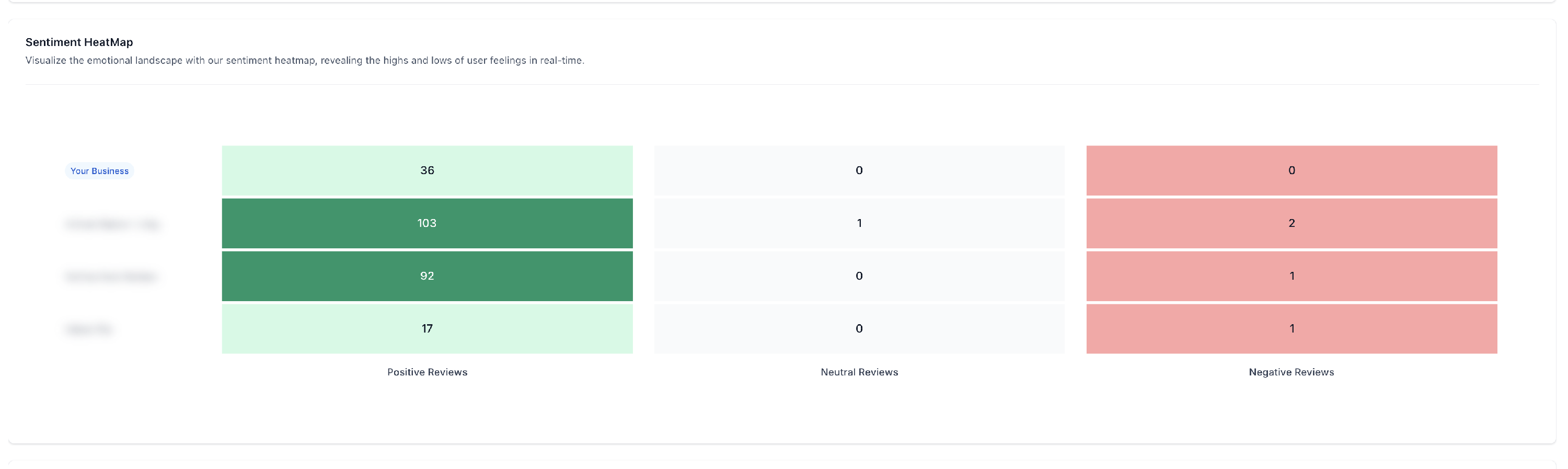
- How many reviews competitors actually have
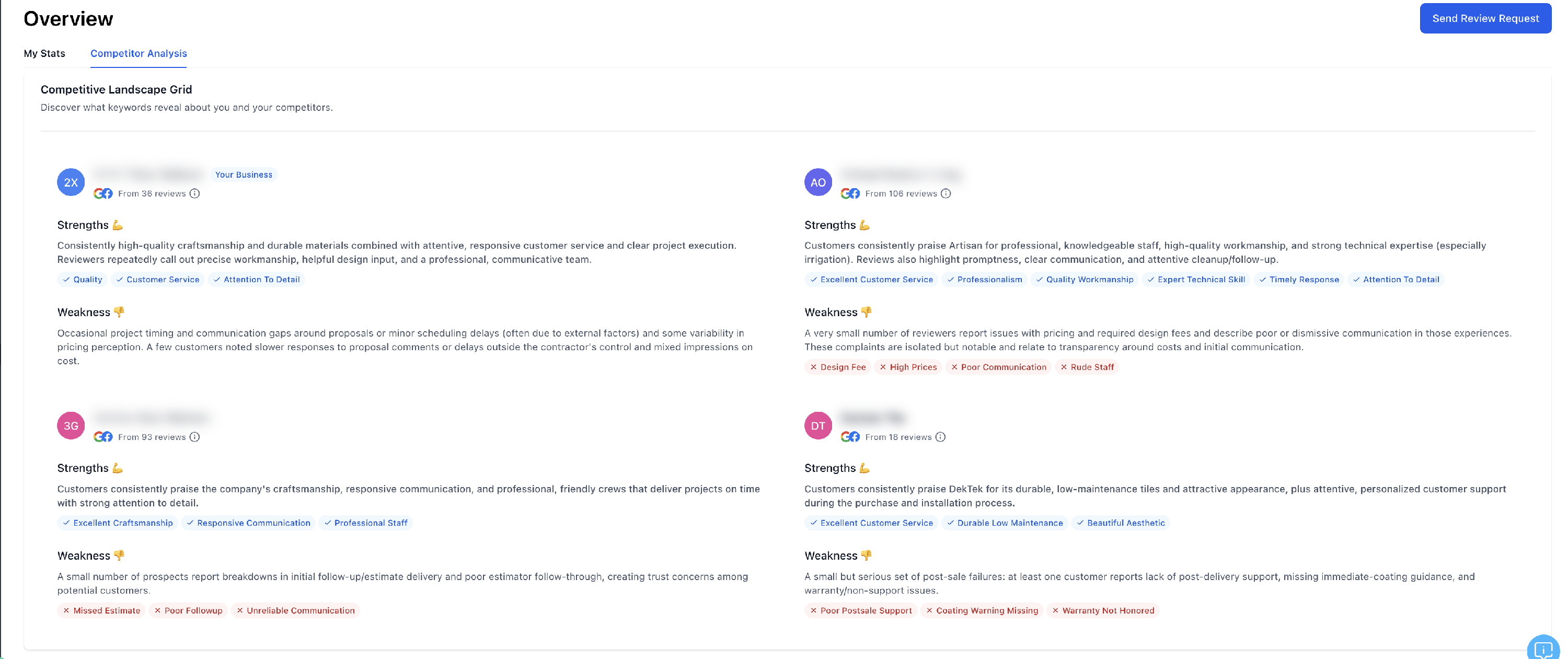
- What customers are saying (good and bad)
- How they stack up side-by-side
So instead of clarity, they’re operating on assumptions.
What We Do Differently
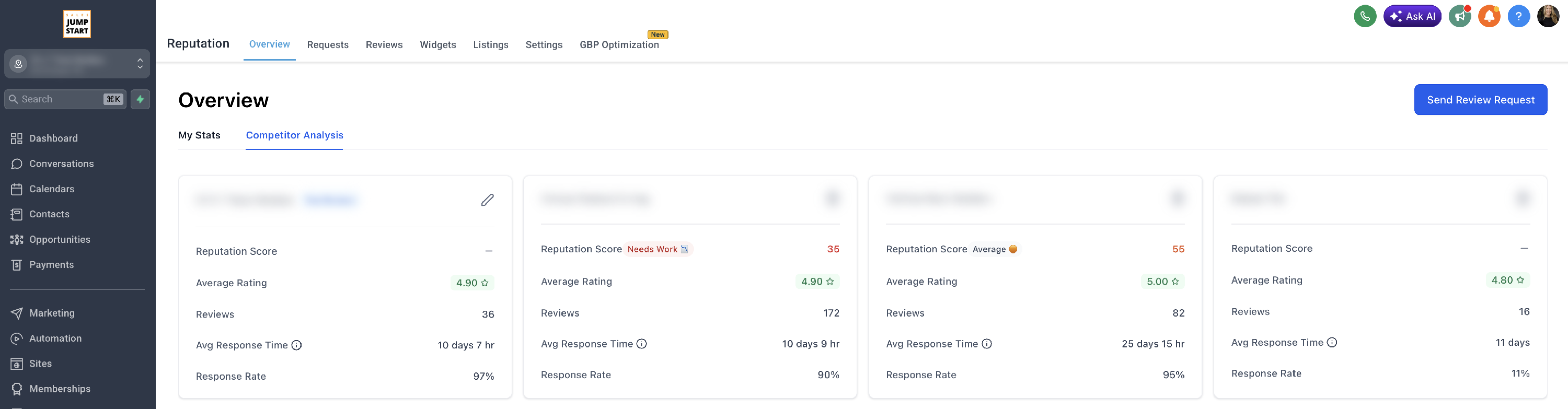
Inside your Sales Jumpstart system, you have access to a Competitor Analysis tool that makes this crystal clear.
This tool isn’t just “another report.”
It gives you:
- Side-by-side comparisons
- Visual charts and tables
- Real customer feedback (not guesses)
So you can instantly see:
💡 Who has more reviews
💡 Who looks more trustworthy
💡 What customers consistently praise or complain about
What This Means For You
This is where things get real.
When you look at this report, you’ll start to notice patterns like:
- A competitor with 3–5x more reviews
- Similar star ratings, but very different review volume
- Clear themes in what customers value (or complain about)
And here’s the truth:
👉 Homeowners don’t overanalyze this.
👉 They go with whoever looks more trusted.
That’s often the builder with:
- More reviews
- More recent activity
- Stronger overall perception
Even if your work is just as good, or better.
What This Tool Is Really For
This is not just a “nice-to-have” report.
It’s a mirror.
It shows you:
- Where you stand
- What your market looks like
- What homeowners are actually responding to
And most importantly… It shows you what needs to change to stay competitive.
What You Can Do On Your End
This is the part that actually moves the needle.
1. Take Ownership of Your Reviews
We’ve built the system to make this easier:
- Automated requests
- Simple workflows
- Built into your CRM
But the reality is: Reviews only happen if you ask consistently.
2. Use the Data as Motivation
If you see a competitor with: 150 reviews and you have 35
That’s not a marketing issue.
That’s an opportunity.
3. Pay Attention to What Customers Are Saying
This tool shows:
- What people love
- What frustrates them
That’s insight you can use to:
- Improve your process
- Improve your service
- Stand out more clearly
Key Takeaways
- Homeowners are comparing you whether you realize it or not
- Reviews and perception heavily influence who gets the job
- This tool gives you a clear, side-by-side view of your market
- The biggest gap we typically see is review volume
- We provide the system, but results come from consistent action
Frequently Asked Questions
How is the Reputation Score determined?
The Reputation Score is a 0–100 score that compares your business against competitors based on real customer data.
It’s not random, and it’s not something we can manually adjust.
It’s calculated automatically using:
- Total Review Volume → How many reviews the business has
- Average Star Rating → Overall customer sentiment
- Responsiveness → How often and how quickly reviews are responded to
It then compares the business directly against the competitors to give a relative score.
Why can’t I see my average response time (or my competitors’)?
There are two common reasons for this:
1. No review responses yet. If you haven’t responded to reviews, the system can’t calculate a response time, so it may show as “–” or 0.
2. Data syncing delays. Even if you have responded, sometimes platforms don’t immediately pass that data through.
This usually resolves on the next data refresh cycle (typically monthly) and is outside of DBM control.